


A Google reviews slider shows your reviews one at a time, or one row at a time, and moves to the next by itself. Search for one and most of what you find is tied to a single WordPress plugin or a single page builder. This guide works on any site: you import the reviews into Shapo, choose the carousel layout, and paste one embed code into WordPress, Wix, Squarespace, Shopify, Webflow or plain HTML.
The slider is free for up to 15 reviews and needs no Google API key. Further down are the settings worth changing and a comparison with three other slider tools, checked on November 23, 2026. Shapo is our product, so read that part with that in mind.
What a Google reviews slider is, and when a grid or a badge fits better
Slider and carousel are two names for the same widget. It takes the height of one review, so it fits in places where a wall of reviews would push everything else down the page: under a hero section, beside a pricing table, above a contact form.
What you give up is visibility. A visitor who does not wait or click sees one or two reviews. Two other layouts cover the cases where that is a problem:
- A grid shows many reviews at once. Use it on a dedicated reviews page, where people come to read.
- A badge shows your star rating and review count in one line. Use it in a header, a footer or next to a checkout button, where there is no room for review text.
On Shapo the slider comes in two versions. Carousel shows one review per slide and is on the free plan, along with the single review and badge layouts. Multi Carousel shows several review cards side by side and is a Pro layout, like the grid.
Add a free Google reviews slider in 3 steps
You need a free Shapo account and a business listed on Google Maps with some reviews. You do not need to own the listing.
1. Import your Google reviews
In your Shapo dashboard, open Testimonials, click Import and choose Google. Type your business name as it appears on Google, for example "Brightside Coffee, Portland", or paste the business's Google Maps link or Place ID. There is no API key or Google Cloud project.
Select your business and set three options: the minimum star rating to fetch, whether to translate reviews into English, and whether to include reviews that have a rating but no text. Click Fetch Reviews, tick the reviews you want and click Import Reviews.
Add testimonials fromGoogle
Brightside Coffee
412 Alder St, Portland, OR
186 reviews ★ 4.8
Select the ones you want to import from the 50 most recent reviews
Maya R.
"Best flat white in the neighbourhood, and the staff remember your order."
★★★★★ Sep 20
Daniel K.
"Great spot to work for a couple of hours. Fast wifi and the banana bread is excellent."
★★★★★ Sep 15
Priya S.
"Ordered a birthday cake with two days notice and it came out exactly like the photo."
★★★★★ Sep 10
2. Pick the carousel layout and style it
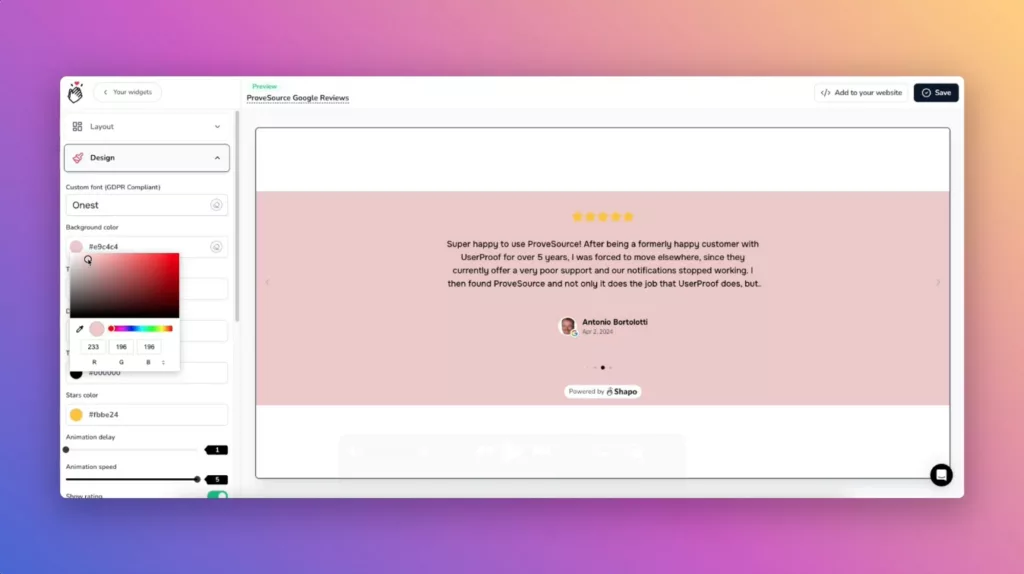
Open Widgets, create a widget and choose Carousel. The editor has a Design tab for the font, the colours of the background, text, stars, arrows and pagination dots, and the slide timing, and a Settings tab for which reviews the slider shows. The preview next to it updates as you change things.
3. Paste the embed code
Click Add to your website and copy the code. It is the same two lines on every platform, with your own widget id:
<div id="shapo-widget-YOUR-WIDGET-ID"></div>
<script id="shapo-embed-js" type="text/javascript" src="https://cdn.shapo.io/js/embed.js" defer></script>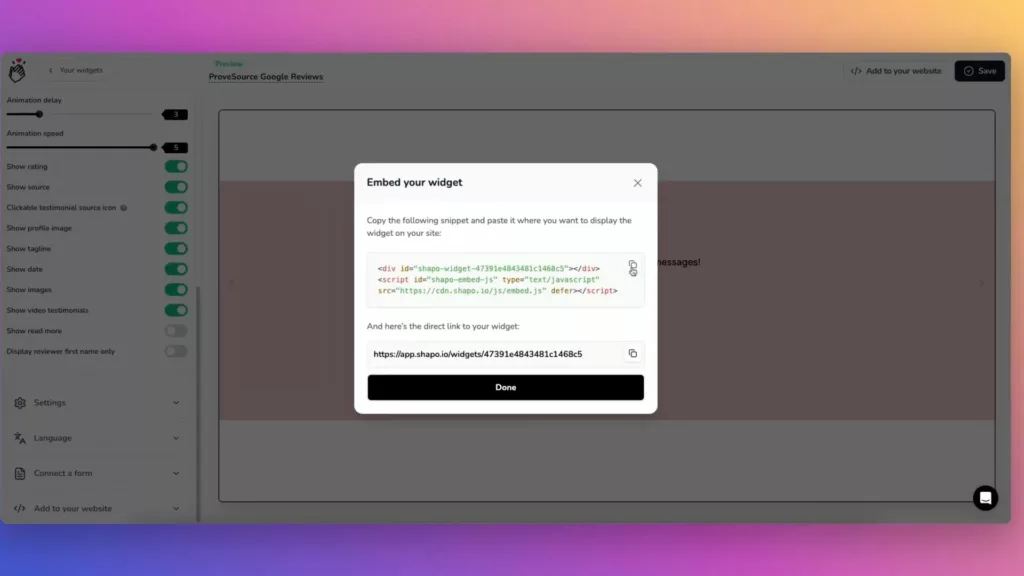
Paste it where the slider should appear. The slider takes the width of whatever it sits in, so put it in a full-width section if you want it to span the page.
Where the code goes on each platform
WordPress
The easier route is the free Shapo plugin. Go to Plugins > Add Plugin, search for Shapo, install and activate it, and click Connect with Shapo. Then add the Shapo Widget block to a page and pick your slider by name. Without the plugin, add a Custom HTML block and paste the code. Our WordPress guide has screenshots of both, plus Elementor and Divi.
Wix
In the Wix Editor, click Add Elements, then Embed Code, then Embed HTML. Paste the code, resize the box so the whole review fits, and publish. There is also a Shapo app in the Wix App Market, which lets you pick the widget from a list in place of pasting code.
Squarespace
Edit the page, add a Code block and paste the code, then save and publish. Code blocks run scripts only on Squarespace plans that allow custom code, so if the slider stays blank, check your plan first. There is a Squarespace walkthrough with a video.
Shopify
In Shopify, go to Online Store > Themes > Customize and open the page or template the slider belongs on. Add a Custom Liquid section, paste the code and click Save. On a product page, add a Custom Liquid block in place of a section. Shapo for Shopify covers product pages that show only that product's reviews.
Webflow and plain HTML
In the Webflow Designer, drag a Code Embed element onto the page, paste the code, save and publish. On a hand-written site, paste the two lines into the HTML at the spot where the reviews should appear. Nothing goes in the <head>.
Slider settings that matter
The defaults work. These are the settings we would look at before publishing, by the names the editor uses.
- Animation delay is how long each review stays before the slider moves on, from 1 to 10 seconds. Short reviews are fine at 3 or 4 seconds. Raise it if your reviews run to a paragraph.
- Animation speed is how fast one slide replaces the next, on a scale of 1 to 5. At 5 the change takes one second.
- Minimum rating limits the slider to 2 stars and up, 3 and up, 4 and up, or 5 stars only.
- Sort testimonials by orders the slides: newest, oldest, random or by rating. Newest first shows visitors that people are still reviewing you.
- Show read more cuts long reviews at a character limit, 200 by default, with a link that expands them. Turn it on if one long review makes its slide much taller than the others.
- Tags and sources let one account feed several sliders, for example a slider per location or per product, or a slider that mixes Google reviews with Facebook and Yelp.
A few things need no setting. The slider pauses while a visitor's pointer is over it and starts again when the pointer leaves. On a phone, visitors swipe between reviews, and the dots under the card show how many there are. The Carousel layout shows one review per slide on every screen size. Multi Carousel has a maximum number of cards and fits fewer on a narrow screen.
Google reviews slider tools compared
These are the tools you are most likely to meet when you search for a Google reviews slider. Two are WordPress plugins and one is a hosted widget like Shapo.
| Tool | Works on | Free version | Paid from |
|---|---|---|---|
| Shapo | Any site by embed code, plus a WordPress plugin and a Wix app | 15 reviews, unlimited widgets, no view limit | $29/month, 2 months free on yearly |
| WP Google Review Slider | WordPress | Slider, grid and list templates, no API key needed | $29/year for 1 site (WP Review Slider Pro) |
| Widgets for Google Reviews (Trustindex) | WordPress | 10 reviews in one widget, one Google Business Profile, manual refresh | $65/year for 1 company |
| Elfsight Google Reviews | Any site by embed code | 1 widget, 200 views a month | $5/month billed yearly |
WP Google Review Slider
This free plugin is what most search results for "Google reviews slider" point to. It downloads your Google reviews into your WordPress database and displays them from there, in a slider, a grid or a list, with autoplay, arrows, dots and swipe. Its wordpress.org listing describes two ways to get reviews: a crawl method that needs no API key and downloads "up to 40+" of your newest or most relevant reviews, and the Google Places API with your own key, which returns 5 reviews and checks for new ones every day.
The paid version, WP Review Slider Pro, adds review sites beyond Google and more template styles. It costs $29 a year for one site, $59 for 5 sites and $149 for 50, or $99 once for a lifetime licence on one site. Both versions run on WordPress only. The vendor sells a separate Embed add-on for Pro that shows its sliders on other websites.
Widgets for Google Reviews by Trustindex
Trustindex's free WordPress plugin has slider layouts among its 45 widget layouts. The free version shows up to 10 Google reviews in one widget from one Google Business Profile, with no view limit, and you refresh the reviews by hand, at most once every 10 days. Automatic updates and more profiles come with a paid Trustindex package, from $65 a year for one company. Our Trustindex alternatives comparison covers what changes off WordPress.
Elfsight Google Reviews
Elfsight is a hosted widget that goes on any site with an embed code. Its plans are capped by views, counted each time the widget loads on a page. The free plan has 1 widget and 200 views a month. Basic is $5 a month billed yearly, or $6 monthly, for 3 widgets and 5,000 views, and Pro is $10 a month billed yearly for 9 widgets and 50,000 views. Elfsight's pricing page says that going over the monthly limit temporarily deactivates the widget. Our Elfsight comparison goes through the view limits.
Where Shapo fits
Shapo's free plan has no view limit and no cap on widgets. The cap is on reviews: 15 across the account. For a slider that is usually enough: 15 slides at 5 seconds each is more than a minute of reviews. Pro, at $29 a month, removes the cap and the Shapo branding, adds Multi Carousel and the other Pro layouts, and re-imports your Google reviews once a day.
If your site is on WordPress, you only want Google reviews, and you would rather keep the reviews in your own database than load a hosted widget, WP Google Review Slider does that for free. Shapo fits better when the site is not on WordPress, when the slider should mix Google with 30+ other review sites, or when you also want forms that collect new testimonials.
Facts checked on November 23, 2026 on each vendor's own pages: WP Google Review Slider (wordpress.org listing, Pro pricing), Trustindex (wordpress.org listing, pricing), Elfsight and Shapo. Vendors change plans often, so check before you buy.