
The best video testimonial software sends customers a link, lets them record on their phone or laptop, and puts the clips on your site with an embed code. Shapo, Senja and Testimonial.to do this with a free plan, VideoAsk suits conversational collection, and Testimonial Hero is the pick if you want a crew to produce the videos for you.
The hard part is getting the videos at all: scheduling, chasing follow-ups and hosting the files. The seven tools below take care of that. We checked each one's prices and free plan on the vendor's own site on September 23, 2026. If you want to know what the clips are worth once you have them, read our guide on measuring testimonial ROI.
What is video testimonial software
Video testimonial software lets you collect, manage and display customer video testimonials on your website without a film crew. You send a form link, and customers record from their phone or laptop in a few minutes.
These platforms handle three core functions:
- Collect: Customers receive a branded form with guided prompts, then record a video without downloading any app.
- Manage: All incoming testimonials land in one dashboard where you review, approve and organise clips by product or campaign.
- Display: Embed your best videos on landing pages, homepages or sales pages using widgets like carousels, grids or "Wall of Love" displays.
You get real customer stories without a production budget, and visitors see real people vouching for your product.
Why video testimonials boost conversions
Text reviews build trust. Video testimonials add a face and a voice. When a potential buyer sees someone on camera describe their experience, the claim is much harder to dismiss than a written quote.
Video often does better than text for social proof for a few reasons:
- Authenticity: Facial expressions, tone of voice and body language are hard to fake. Viewers pick up on genuine enthusiasm.
- Memorability: Stories told on video stick. A customer describing how your product solved their problem is easier to remember than a line of text.
- Trust signals: Seeing a real person, not a stock photo, shows that your reviews come from actual customers.
Video testimonials work like brand videos, with one difference that matters: your customers are talking, not your marketing team.
The 7 best video testimonial platforms
The right tool depends on your budget, your volume and how you plan to use the videos. Below are seven platforms worth considering, each with different strengths. Prices are as listed on each vendor's pricing page on September 23, 2026.
Shapo
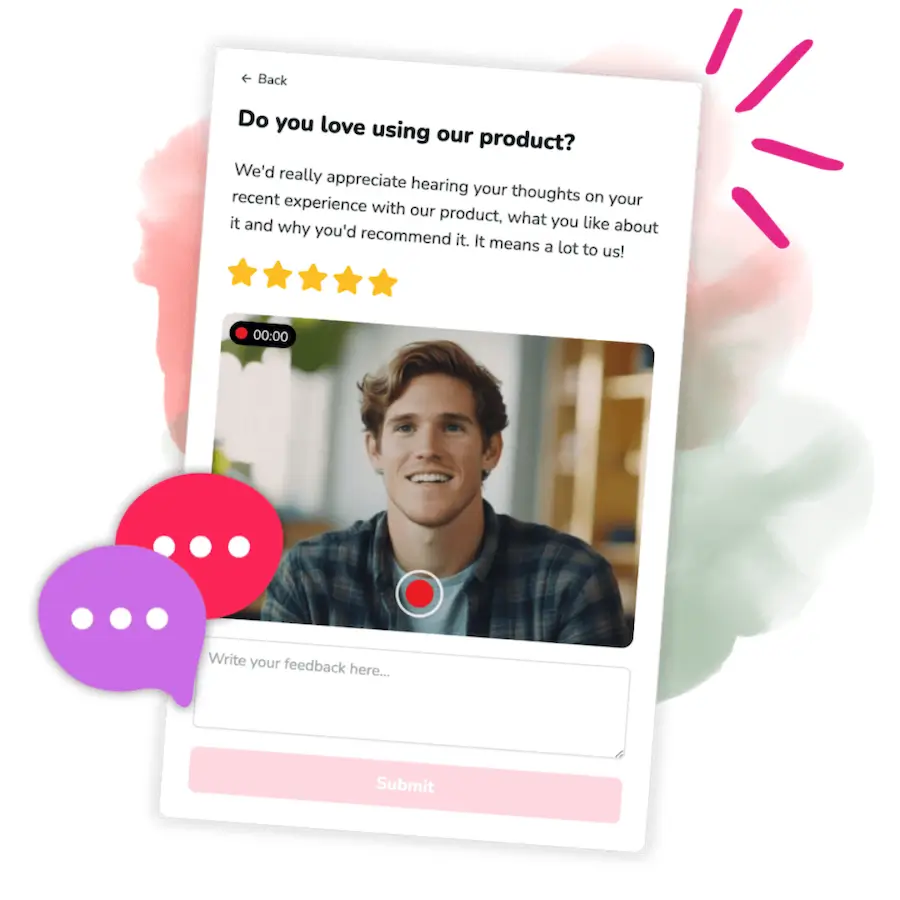
Shapo is a testimonial platform for teams that want text and video testimonials in one place. You build a collection form, send the link, and clips arrive in your dashboard ready to approve and embed.
Key features:
- Forms that take text and video testimonials, a star rating, photos and custom fields
- Carousel, grid, marquee, single, list, badge and floating toast widgets, plus a hosted Wall of Love page
- Dropdown answers that map to tags, so one form can serve several products
- On Pro, imports from 30+ platforms, including G2, Capterra, Google, Facebook and X
Best for: SaaS companies, course creators, agencies and online stores that want to collect and show video and text testimonials with one tool.
Integrations: Widgets go on any site with one embed snippet.
Pricing: The free plan has no time limit and covers up to 15 testimonials, video included, with unlimited forms and widgets and Shapo branding. Pro costs $29 a month, or $290 a year, and adds unlimited testimonials, imports, branding removal and 500 email campaign invites a month (Shapo pricing).
Testimonial.to
Testimonial.to is known for its clean interface and its public "Wall of Love" page. It collects text and video in the same form and is popular with indie makers and small SaaS teams.
Key features:
- A public Wall of Love page and embed widgets on every plan
- Video and text collection in one form, with videos up to 2 minutes on Free and Starter and 5 minutes on Ultimate
- Unlimited X and LinkedIn imports, even on the free plan
Best for: Solo founders, small teams and creators who want a quick setup.
Integrations: REST API, webhooks, Zapier and Make on the Ultimate + plan.
Pricing: The free plan covers 10 text and 2 video testimonials in total, in 1 space. Starter costs $25 a month ($300 a year) and Ultimate $50 a month ($600 a year) (Testimonial.to pricing).
VideoAsk
VideoAsk, made by Typeform, takes a conversational approach. You record a video question, send the link, and customers reply with their own video. It feels more like a dialogue than a form, and testimonial collection is one of its listed use cases.
Key features:
- Asynchronous video conversations
- Conditional logic that routes people to different steps based on their answers
- An embed widget for your website
Best for: Teams that want interactive testimonials or detailed feedback alongside video clips.
Integrations: Connects to more than 1,500 apps through Zapier, or through its API.
Pricing: You can start with a free account. Paid plans are sized by the minutes of video and audio recorded each month, and removing VideoAsk branding needs the Brand plan. We could not confirm current prices on its pricing page, so check VideoAsk pricing before you buy.
Senja
Senja collects video and text testimonials and turns them into widgets and Walls of Love. Its free plan is one of the more generous on this list, and paid plans add team features and SEO extras for growing teams that run testimonial collection across several products.
Key features:
- Imports from 18 social media sites and review platforms
- Unlimited widgets, with 20+ templates, and unlimited Walls of Love on every plan
- Custom domains and HD video exports from Starter; rich snippets and translation into 20 languages on Pro
Best for: Small teams that want a free start and plan to grow into team seats and multiple projects.
Integrations: Zapier, API and webhooks from the Starter plan.
Pricing: The free plan covers 15 video and text testimonials. Starter costs $29 a month with unlimited testimonials, 3 forms and 2 seats; Pro costs $59 a month with unlimited forms and 5 seats (Senja pricing).
Why Senja replaced Vouch: earlier versions of this list included Vouch. Its site now describes it as a platform for employer brand and internal comms teams working with employee content, so it no longer fits a list of customer testimonial tools.
Boast
Boast focuses on video testimonials and also runs customer surveys, including NPS. Its request sequences by email and SMS make it a fit for businesses that want a steady flow of videos rather than a one-off campaign.
Key features:
- Hosted or embedded forms, with 1 to 10 video fields per form depending on plan
- Request sequences by email and SMS, with video editing and automations on Team and Premium
- Embed widgets for your site and ad-free video hosting
Best for: Businesses that want video testimonials and survey feedback in one workflow and have the budget for it.
Integrations: Zapier, to send testimonials to other tools.
Pricing: No free plan, but a 14-day free trial with no card. Basic costs $59 a month, or $50 a month billed yearly for 600 responses a year; Team is $119 monthly or $100 yearly (Boast pricing).
Trustmary
Trustmary combines review imports with video testimonial collection. If you already have reviews on other sites, it can pull them in and show them next to new video testimonials, which it usually collects through an automated request form.
Key features:
- Review imports on every plan, with automatic imports and 3 review connections on Starter
- Video testimonial requests sent through a form
- Review Schema.org markup and custom surveys on Starter
Best for: Businesses with reviews on other platforms that want them in one place alongside new video testimonials.
Integrations: HubSpot, Pipedrive, Zapier, Make, QuickBooks and Google Sheets.
Pricing: The free plan allows 200 widget views and 5 responses a month. Paid plans are priced by monthly widget views and responses (Trustmary pricing).
Testimonial Hero
Testimonial Hero is different from the other tools on this list. It is a done-for-you service, not self-service software. A professional interviewer runs the session remotely, or a crew films on-site, and the team edits and delivers the finished videos.
Key features:
- A dedicated project manager and strategy sessions on every package
- Live remote interviews, or on-site filming of 3 to 6 interviews plus B-roll in a half or full day
- Async self-capture included free with subscriptions
Best for: Companies that want polished, produced testimonials and have the budget for professional production.
Integrations: Not applicable, as it is a service rather than software.
Pricing: Package-based on a 12-month term. Video-only packages run from $3,800 to $6,200 for remote filming and $9,200 to $11,800 on-site (Testimonial Hero pricing).
Video testimonial software comparison table
| Tool | Video + Text | Free Plan | Paid From | Best For |
|---|---|---|---|---|
| Shapo | Yes | Yes (15 testimonials, video included) | $29/mo | Collecting and displaying text and video in one tool |
| Testimonial.to | Yes | Yes (10 text, 2 video) | $25/mo | Simple setup for small teams |
| VideoAsk | Yes | Yes (free account) | See pricing page | Conversational, interactive collection |
| Senja | Yes | Yes (15 testimonials) | $29/mo | Growing teams with several projects |
| Boast | Video focus, plus surveys | No (14-day trial) | $50/mo yearly, $59 monthly | Video testimonials and surveys combined |
| Trustmary | Yes | Yes (200 views, 5 responses a month) | Priced by views and responses | Importing existing reviews |
| Testimonial Hero | Yes (produced for you) | No | $3,800 (package) | Professionally produced videos |
How to use this comparison chart
The chart gives you a quick overview, but the decision goes deeper than ticking boxes. Here is how to use it.
Start with your requirements. If you need video and text testimonials in one workflow, rule out tools that only handle one. If budget is tight, compare what the free plans actually include: Shapo and Senja allow 15 testimonials, and Testimonial.to 10 text plus 2 video.
Test the customer side, not just the feature list. Most tools offer a free plan or trial, so send the form to a colleague and watch how easy the recording is on a phone. Every extra step costs you responses.
Consider how much setup you want. Some platforms need more configuration, while others work out of the box. If you want testimonials coming in this week, favour the simpler tools.
Think about growth. A simple tool works for your first 10 testimonials, but you may later manage hundreds across several products. Check the price of the plan you will need in a year, not just the one you start on.
How to choose the right video testimonial tool
Not every platform fits every team. These five points decide most choices.
Ease of use for you and your customers
The simpler the recording process, the more responses you get. Look for tools where customers record in their browser, with no app download and no account to create. On your side, the form builder and dashboard should be quick to learn, not a second job.
Video and text testimonial support
Some customers prefer writing. Others are happy to record a quick video. A platform that handles both lets you collect more testimonials and mix formats on your site. A good testimonial form template offers both options on the same form.
Embeddable widgets and integrations
Check that the tool's embed code works with your website builder, such as Shopify, WordPress or Webflow. Widgets you can style to match your brand make testimonials sit naturally on the page. Browse testimonial widget layouts or Wall of Love examples to see which format suits you.
Pricing and free plan availability
If you are just starting, a free plan lets you test the workflow before you commit. As you grow, compare what each pricing level includes: testimonial limits, video length, branding removal and email campaigns. Service-based options like Testimonial Hero are priced per package, which is a different kind of budget.
Testimonial management and organisation
Once testimonials start coming in, you need a clean way to review, approve and organise them. Approval steps and tagging help most when you manage several products or brands.
How to get video testimonials from customers
Collecting video testimonials does not require a production crew. This five-step process works with most tools.
1. Create a testimonial collection form
Start by building a branded form with 2 to 4 guided questions. Prompts like "What problem were you facing before using our product?" and "What results have you seen?" help customers know what to say.
Pro Tip: Keep questions short and specific. Vague prompts lead to vague answers.
2. Send the form link to happy customers
Timing matters. The best moment to ask is right after a positive interaction, such as a successful onboarding call, a glowing support ticket or a milestone reached. Share the link by email, SMS or an in-app message.
3. Let customers record from any device
Most testimonial tools let customers record in the browser on a phone or laptop, with nothing to install. Keep the ask short: a 60-second answer to two questions is plenty.
4. Review and approve incoming testimonials
As clips come in, watch each one and pick the best. Organise them by product, use case or campaign so you can find the right testimonial quickly.
5. Embed video testimonials on your website
Once you have approved your favourites, copy the widget embed code and paste it into your website builder. Put the strongest clip near your main call to action, and collect the rest on a Wall of Love page.
Start collecting video testimonials for free
You do not need a budget to begin. Shapo's free plan includes up to 15 testimonials, video included, with unlimited forms and widgets and no time limit. Start collecting today, and move to Pro at $29 a month when you need unlimited testimonials. See how it works on our video testimonials page.
FAQs about video testimonial software
How much does professional video testimonial production cost?
Done-for-you production costs thousands of dollars. Testimonial Hero, for example, lists video-only packages from $3,800 for remote filming and from $9,200 on-site. Self-service software lets customers record clips themselves for the price of a monthly plan, and several tools, including Shapo, have a free plan.
Can you use video testimonial software without paying?
Yes. Shapo, Senja and Testimonial.to all have free plans that include video collection and embeddable widgets, with limits on how many testimonials you can keep. Branding removal and higher limits usually need a paid plan.
What makes a video testimonial effective?
The best testimonials are specific. Look for clips where customers describe the problem they faced, how your product helped and the result they got. Generic praise ("It's great!") persuades far less than a concrete outcome.
Do customers need special equipment to record a video testimonial?
No. Customers can record from their phone or laptop browser using the form link you send. They need no app and no special camera, only a device with a webcam or front-facing camera.
Can you import existing video testimonials into testimonial software?
Many platforms allow you to upload video files you already have. Some also let you import text reviews from social media and third-party sites like G2, Capterra, and Google.
Should you use video testimonials or text testimonials?
Both formats build trust, but video creates a stronger emotional connection. Ideally, use a platform that supports both so you can mix formats across your site for maximum impact.