According to Nielsen’s global study, customers trust other customers more than they trust your marketing—88% of consumers trust recommendations from people they know above all other forms of marketing. That’s why video testimonials convert —seeing a real person describe their experience carries more weight than any tagline you could write.
The challenge is actually getting those videos. Coordinating schedules, chasing follow-ups, and figuring out where to host the clips can turn a simple ask into a project. Video testimonial software handles the logistics so you can focus on collecting stories, not managing production. Below, you’ll find seven tools that make it easy to collect, organize, and display customer videos on your site.
What is video testimonial software
Video testimonial software lets you collect, manage, and display customer video testimonials on your website—without coordinating film crews or chasing customers over email. You send a form link, and customers record directly from their phone or laptop in a few minutes.
These platforms handle three core functions:
- Collect: Customers receive a branded form with guided prompts, then record a video without downloading any app.
- Manage: All incoming testimonials land in a central dashboard where you review, approve, and organize clips by product or campaign.
- Display: Embed your best videos on landing pages, homepages, or sales pages using widgets like carousels, grids, or “Wall of Love” displays.
The result is authentic customer stories without production headaches—and visitors see real people vouching for your product.
Why video testimonials boost conversions
Text reviews build trust. Video testimonials build connection. When a potential buyer sees someone on camera describing their experience, it feels more real than a written quote ever could—82% of people say watching a video has convinced them to buy a product or service.
Video outperforms text for social proof for a few reasons:
- Authenticity: Facial expressions, tone of voice, and body language are nearly impossible to fake. Viewers pick up on genuine enthusiasm.
- Emotional resonance: Stories told on video stick. A customer describing how your product solved their problem creates a memorable moment that text alone can’t replicate.
- Trust signals: Seeing a real person—not a stock photo—validates that your reviews come from actual customers.
Video testimonials tap into the same persuasive power as brand videos (91% of businesses now use video as a marketing tool), but with the added credibility of coming from your customers rather than your marketing team.
The 7 best video testimonial platforms
Choosing the right tool depends on your budget, technical comfort, and how you plan to use testimonials. Below are seven platforms worth considering—each with different strengths.
Shapo
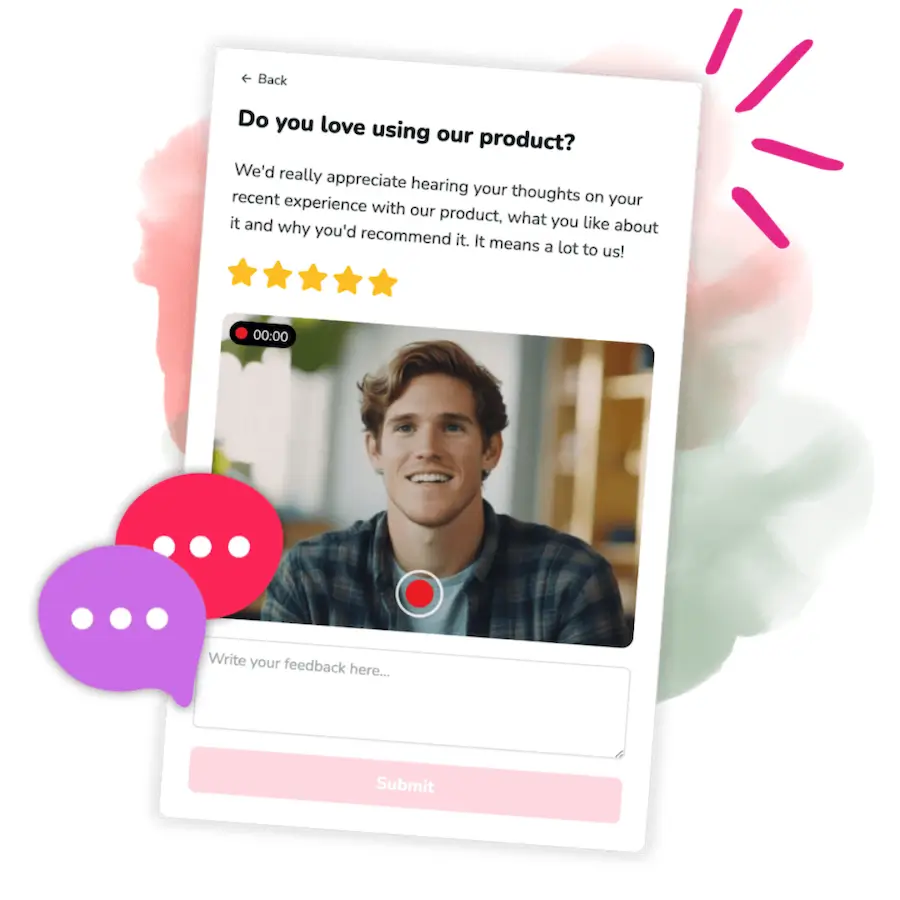
Shapo is an all-in-one testimonial platform built for teams that want both text and video testimonials in one place. You can create a collection form in about 30 seconds, send it to customers, and receive video clips directly in your dashboard.
Key features:
- Cross-device recording (smartphone or desktop, no app required)
- “Wall of Love” and carousel widgets with full design customization
- Multi-workspace support for managing testimonials across different products or brands
- Import existing reviews from G2, Capterra, Google, and social media
Best for: SaaS companies, course creators, agencies, and e-commerce brands that want a simple way to collect and display both video and text testimonials.
Integrations: Embed widgets on Shopify, WordPress, Webflow, Bubble, Squarespace, and more via copy-paste code.
Pricing: Free plan includes unlimited video testimonials, unlimited forms, and unlimited widgets. Pro plan ($29/month) adds testimonial imports, branding removal, and email campaign invites.
Testimonial.to
Testimonial.to gained popularity for its clean interface and straightforward “Wall of Love” display. It handles both text and video collection and is a favorite among indie makers and small SaaS teams.
Key features:
- Simple form builder with customizable questions
- Embeddable widgets including a signature wall-of-love layout
- Video and text collection in one form
Best for: Solo founders, small teams, and creators who want a no-fuss setup.
Integrations: Works with most website builders via embed code.
Pricing: Free tier available with limited testimonials. Paid plans start around $20/month.
VideoAsk
From the team behind Typeform, VideoAsk takes a conversational approach. You record a video question, send the link, and customers reply with their own video. It feels more like a dialogue than a form.
Key features:
- Asynchronous video conversations
- Conditional logic to branch questions based on responses
- Built-in transcription and analytics
Best for: Teams that want interactive, human-touch testimonials or detailed feedback alongside video clips.
Integrations: Connects with Zapier, HubSpot, Google Sheets, and more.
Pricing: Free plan includes limited video minutes. Paid plans start at $24/month.
Vouch
Vouch is designed for larger teams and enterprise use cases. It offers advanced campaign management, detailed analytics, and collaboration features that make it easier to coordinate testimonial collection across departments.
Key features:
- Campaign workflows for managing large-scale collection efforts
- Team collaboration tools with approval workflows
- Detailed engagement analytics
Best for: Mid-size to enterprise companies with multiple stakeholders involved in testimonial collection.
Integrations: Integrates with Slack, Salesforce, and major CRMs.
Pricing: Custom pricing based on team size and feature requirements.
Boast
Boast combines video testimonials with survey-style feedback collection. While it supports video, its feature set leans toward gathering detailed customer input alongside clips.
Key features:
- Multiple form types including NPS and survey questions
- Video, audio, and text collection
- Automated follow-up sequences
Best for: Businesses that want to collect structured feedback and testimonials in one workflow.
Integrations: Connects with Zapier, HubSpot, and Salesforce.
Pricing: Plans start around $50/month.
Trustmary
Trustmary stands out for its ability to import reviews from third-party sites like G2, Google, and Capterra. If you already have reviews scattered across the web, Trustmary pulls them into one dashboard.
Key features:
- Import reviews from 10+ platforms
- Video and text testimonial collection
- A/B testing for testimonial widgets
Best for: Businesses with existing reviews on multiple platforms who want to consolidate and display them in one place.
Integrations: Imports from G2, Capterra, Google, Facebook, Yelp, and more.
Pricing: Free plan available. Paid plans start around $19/month.
Testimonial Hero
Testimonial Hero is different from the other tools on this list—it’s a done-for-you service, not self-service software. The team handles everything: scheduling, filming (remotely or on-site), editing, and delivery.
Key features:
- Professional video production with dedicated project managers
- Remote and on-location filming options
- High-production-value final deliverables
Best for: Companies that want polished, broadcast-quality testimonials and have the budget for professional production.
Integrations: N/A (service-based, not software).
Pricing: Starts around $3,000+ per video depending on scope.
Video testimonial software comparison table
| Tool | Video + Text | Free Plan | Embeddable Widgets | Best For |
|---|---|---|---|---|
| Shapo | ✓ | ✓ (unlimited video) | ✓ | All-in-one collection + display |
| Testimonial.to | ✓ | ✓ (limited) | ✓ | Simple setup for small teams |
| VideoAsk | ✓ | ✓ (limited minutes) | ✓ | Conversational, interactive collection |
| Vouch | ✓ | ✗ | ✓ | Enterprise teams |
| Boast | ✓ | ✗ | ✓ | Feedback + testimonials combined |
| Trustmary | ✓ | ✓ | ✓ | Importing existing reviews |
| Testimonial Hero | Video only | ✗ | ✗ | High-production professional videos |
How to use this comparison chart
This comparison chart gives you a quick overview, but the decision goes deeper than checking boxes. Here’s how to make the most of platform comparisons when choosing video testimonial software:
Start with your must-haves. If you need both video and text testimonials in one workflow, eliminate tools that only handle video. If budget is tight, focus on platforms with robust free plans rather than trying to justify premium features you might not use.
Look beyond the features list. A platform might check all your boxes on paper but feel clunky in practice. Most tools offer free trials or demos—use them to test the customer-facing experience. Send the testimonial form to a colleague and see how smooth the recording process feels.
Consider your technical comfort level. Some platforms require more setup and customization, while others work out of the box. If you want to get testimonials flowing quickly without learning new systems, prioritize tools known for ease of use.
Think about growth. A simple tool might work for collecting your first 10 testimonials, but what happens when you need to manage hundreds across multiple products? Choose a platform that can scale with your needs rather than one you’ll outgrow in six months.
How to choose the right video testimonial tool
Not every platform fits every team. Here’‘s what to weigh as you evaluate your options.
Ease of use for you and your customers
The simpler the recording process, the more responses you’ll get. Look for tools where customers can record directly in their browser—no app downloads, no account creation required. On your end, the form builder and dashboard work best when they feel intuitive rather than like a second job.
Video and text testimonial support
Some customers prefer writing. Others are happy to record a quick video. A platform that handles both gives you flexibility to collect different types of social proof and mix formats on your site.
Embeddable widgets and integrations
Check that the tool offers embed codes compatible with your website builder—whether that’s Shopify, WordPress, Webflow, or something else. Widgets that match your brand’s look and feel make testimonials blend naturally into your pages.
Pricing and free plan availability
If you’re just getting started, a generous free tier lets you test the workflow before committing. As you scale, compare what’s included at each pricing level: testimonial limits, branding removal, and advanced features like email campaigns.
Testimonial management and organization
Once testimonials start rolling in, you’ll want a clean way to review, approve, and organize them. Features like approval workflows, tagging, and workspace separation help if you manage multiple products or brands.
How to get video testimonials from customers
Collecting video testimonials doesn’t require a production crew. Here’s a straightforward process that works with most tools.
1. Create a testimonial collection form
Start by building a branded form with 2–4 guided questions. Prompts like “What problem were you facing before using our product?” and “What results have you seen?” help customers know exactly what to say.
Pro Tip: Keep questions short and specific. Vague prompts lead to vague answers.
2. Send the form link to happy customers
Timing matters. The best moment to ask is right after a positive interaction—a successful onboarding call, a glowing support ticket, or a milestone achieved. Share the link via email, SMS, or even in-app messages.
3. Let customers record from any device
Modern testimonial tools let customers record directly from their browser on any device. No app download, no friction. Most people can complete a 60-second video in under five minutes.
4. Review and approve incoming testimonials
As clips come in, watch each one and select the best. Organize by product, use case, or campaign so you can quickly find the right testimonial when you need it.
5. Embed video testimonials on your website
Once you’ve approved your favorites, copy the widget embed code and paste it into your website builder. Most platforms support Shopify, WordPress, Webflow, Squarespace, and similar tools.
Start collecting video testimonials for free
You don’t need a budget to begin. Shapo’s free plan includes unlimited video testimonials, unlimited forms, and embeddable widgets—so you can start gathering social proof today and display it wherever your customers are.
FAQs about video testimonial software
How much does professional video testimonial production cost?
Done-for-you services with film crews and professional editing typically run $3,000–$10,000+ per video. Self-service software, on the other hand, lets customers record authentic clips themselves at little to no cost—often just the price of a monthly subscription.
Can you use video testimonial software without paying?
Yes. Many platforms offer free plans with core features like form creation, video collection, and basic widgets. Premium features—branding removal, advanced analytics, higher limits—usually require a paid tier.
What makes a video testimonial effective?
The best testimonials are specific and authentic. Look for clips where customers describe the problem they faced, how your product helped, and the tangible results they experienced. Generic praise (“It’s great!”) doesn’t convert as well as concrete outcomes.
Do customers need special equipment to record a video testimonial?
No. Customers can record directly from their smartphone or laptop browser using the form link you send. No app download, no special camera—just a device with a webcam or front-facing camera.
Can you import existing video testimonials into testimonial software?
Many platforms allow you to upload video files you already have. Some also let you import text reviews from social media and third-party sites like G2, Capterra, and Google.
Should you use video testimonials or text testimonials?
Both formats build trust, but video creates a stronger emotional connection. Ideally, use a platform that supports both so you can mix formats across your site for maximum impact.